Most plant software asks you to migrate. The project runs for eighteen months, finance loses its reporting history, and the shop floor ends up keying the same number into two systems anyway. Meanwhile the ERP still learns what happened on the line the next morning, from a spreadsheet.
ManuFactoryIQ connects to the ERP you already run, through its own native interface. Shop-floor actions are validated at the scanner, buffered locally, and posted as clean transactions your general ledger already understands — with a retry path for the ones it rejects.
Four stages, one direction of travel, and an explicit route for the transactions your ERP refuses.
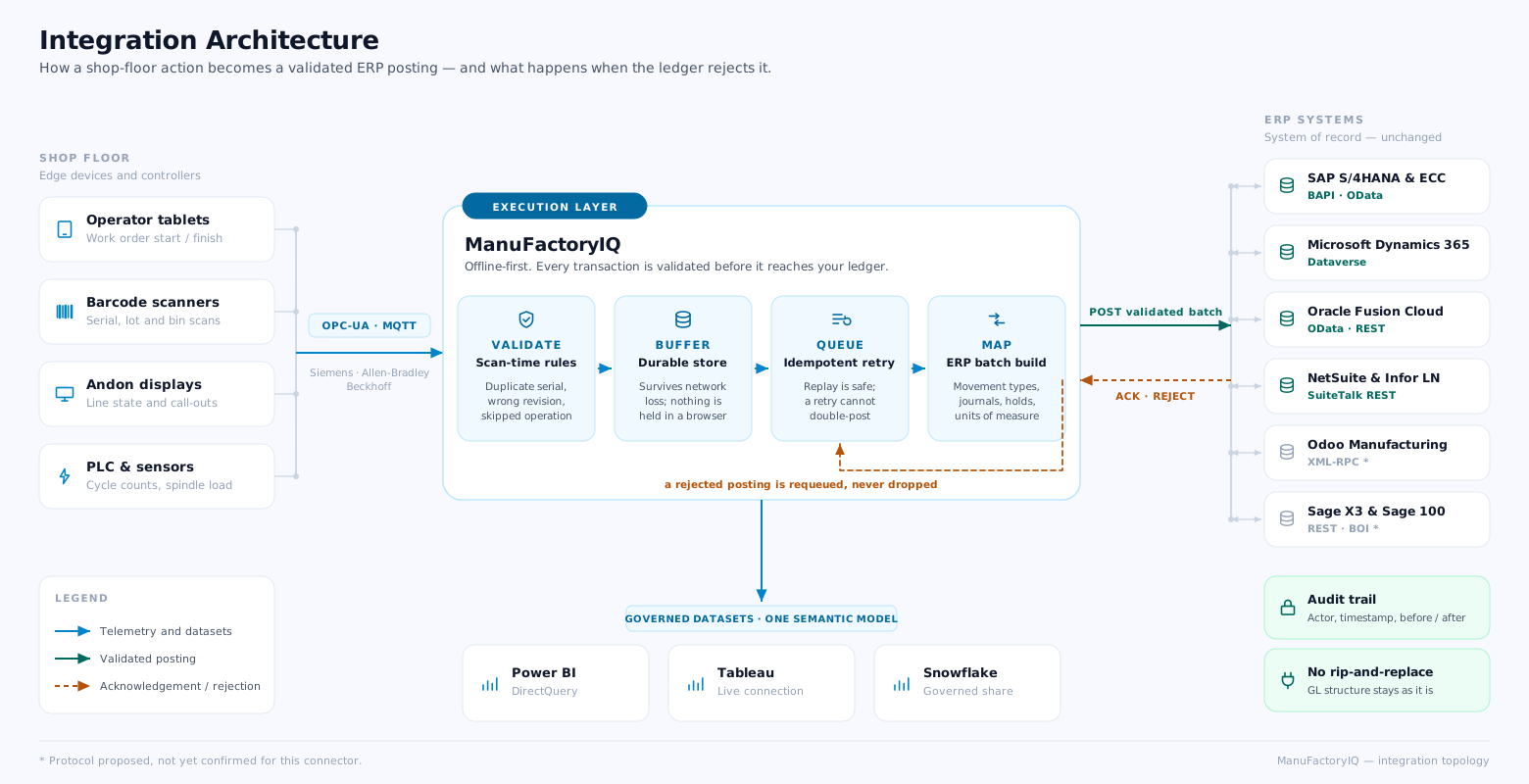
No generic middleware layer pretending every ERP is the same one. What is read, what is written, and which object it lands on — per system.
 CONNECTOR 01 • BAPI & ODATA
NATIVE INTERFACE
CONNECTOR 01 • BAPI & ODATA
NATIVE INTERFACE
SAP is where most plants have the widest gap between the ledger and the line. Confirmations are keyed late, goods movements are batched overnight, and by the time a variance is visible the order has already closed.
Planned and released orders are pulled through OData; confirmations and goods movements are written back through BAPI in the same shift they happen.
Movement types are handled explicitly rather than guessed: 101 for goods receipt from production, 261 for issue to an order, 322 for the transfer out of quality inspection into unrestricted stock.
Batch and serial numbers travel with the movement, so lot genealogy in SAP matches what the scanner actually recorded on the floor.
"The confirmation reaches SAP while the operator is still standing at the machine."
 CONNECTOR 02 • DATAVERSE
LIVE CONNECTOR
CONNECTOR 02 • DATAVERSE
LIVE CONNECTOR
Business Central and Supply Chain Management are strong at planning and weak at knowing what the floor did between planning cycles. Purchase orders drift, and inventory holds live in someone's head until a shortage surfaces.
The connector syncs through Dataverse, so the same records your Power Platform apps read are the ones being updated — no shadow copy to reconcile later.
Purchase order changes move in both directions. A supplier confirmation recorded at the receiving dock updates the order, and a planner's reschedule reaches the dock before the truck does.
Inventory holds are enforced on both sides at once: material quarantined by Quality is unavailable in D365 in the same transaction, not after the nightly job.
"A hold placed on the floor is a hold in Dynamics, in the same transaction."
 CONNECTOR 03 • ODATA & REST
RECONCILED PIPELINE
CONNECTOR 03 • ODATA & REST
RECONCILED PIPELINE
Fusion gives you a clean work definition and then asks the plant to report against it accurately. Output, consumption and scrap are the three numbers that drift apart, and the reconciliation lands on cost accounting at month end.
Operation completions, material transactions and scrap are posted as one reconciled set rather than three independent feeds that have to agree by coincidence.
Work definitions and work orders are read through REST; completions and transactions are written back against the same operation sequence, so a partial completion does not orphan its material issue.
Where cost accounting needs a resource transaction, it is derived from the machine run that actually happened, not from a standard rate applied after the fact.
"Output, consumption and scrap arrive as one set, already reconciled."
 CONNECTOR 04 • SUITETALK REST
ZERO CODE REQUIRED
CONNECTOR 04 • SUITETALK REST
ZERO CODE REQUIRED
Mid-market high-mix shops run short orders with constant changeovers. The ERP is right about the order and wrong about the bin, because nobody has time to record a move that takes eight seconds to make.
SuiteTalk REST handles the write side, so assembly builds, fulfilments and inventory adjustments post without a custom SuiteScript to maintain.
Bin and lot detail is carried on every transaction. A part moved from the machine to the inspection rack is a real inventory move, not a note on a traveller.
Infor LN is served by the same mapping layer through its own REST surface, which keeps multi-site groups running mixed ERPs on one integration model.
"An eight-second move becomes a real transaction instead of a note on a traveller."
 CONNECTOR 05 • EXTERNAL API
SCOPED PER DEPLOYMENT
CONNECTOR 05 • EXTERNAL API
SCOPED PER DEPLOYMENT
Odoo deployments are rarely identical. Custom fields, community modules and version differences mean a connector that assumes a stock schema breaks on the second customer.
The integration is built against Odoo's External API, reading and writing the manufacturing models directly — production orders, work orders and stock moves.
Because the API is model-level rather than endpoint-level, custom fields added by your implementer are addressable without a connector rebuild.
Field mapping is confirmed against your database during the architecture review rather than assumed, which is why this connector is scoped per deployment instead of shipped as a fixed template.
"Your custom fields are part of the mapping, not an exception to it."

 CONNECTOR 06 • WEB SERVICES & BOI
MIXED CADENCE
CONNECTOR 06 • WEB SERVICES & BOI
MIXED CADENCE
These are two different products with the same name on the box, and pretending otherwise is how Sage integrations fail. They get separate treatment here.
Sage X3 exposes REST web services, so work orders, stock journals and labour entries move in near real time in both directions.
Sage 100 has no real-time write surface. It is integrated through the Business Object Interface, which means postings are grouped and committed on a short cycle rather than instantly — typically every few minutes.
The floor experience is identical either way: the operator scans, gets an immediate answer, and the transaction is buffered. Only the commit cadence into the ledger differs, and the queue shows exactly where each posting is.
"Sage 100 commits on a cycle, not instantly — we say so rather than calling it real time."
Cycle counts, spindle load, downtime reasons and station state are read directly from the controller. No operator retypes a number a PLC already knows.
One model with permissions attached, published outward. Two departments cannot build two definitions of yield and then argue about whose number is right.
ManuFactoryIQ is an execution layer, not a replacement ledger. The integration is designed so that the worst case is a queued transaction — never a corrupted one.
SAP, Microsoft Dynamics 365, Oracle, NetSuite, Sage and Odoo names and marks are the property of their respective owners and are shown to identify the systems this platform connects to; they do not indicate partnership, certification or endorsement.
Send us your ERP, version and the transactions that hurt most today. We come back with the object mapping, the write path, and an honest answer about anything your version cannot do.